


SEO Website Migration Checklist: Guide to Protect Your Rankings & Traffic in 2026
13 Mar 2026
 Mike Patel
Website migrations have a reputation for being risky, and for good reason. When URLs change, platforms shift, or site structures are rebuilt, search engines can temporarily lose their understanding of your website. That confusion often shows up as sudden traffic drops, ranking volatility, or pages disappearing from search results.
The important truth, however, is this: SEO traffic loss during migrations is not inevitable. In most cases, drops happen because of missed steps, rushed decisions, or poor post-launch monitoring, not because migrations themselves are harmful.
This guide exists to make your migration predictable and controlled, not risky.
What SEO Website Migration Really Means
An SEO website migration is any significant change that affects how search engines crawl, index, or interpret your site. It’s not just moving content from one place to another, it’s about preserving the SEO signals you’ve already earned; including rankings, backlinks, internal link equity, and user trust.
When handled correctly, a migration allows you to modernize your site, improve performance, and even unlock new growth. When handled poorly, this can undo years of SEO progress in days.
Types of Website Migrations Covered in this Guide
The checklist below applies to all major migration scenarios:
- Domain Changes: example.com → newexample.com
- Platform or CMS Migrations: WordPress to Shopify, Magento to custom builds
- HTTPS Migrations: HTTP → HTTPS
- Site Redesigns: That change the URL structures
- Subdomain to Subfolder Moves: blog.site.com → site.com/blog
- Site Consolidations: Where multiple sites merge into one
Each of these carry different risks, but the same core principles apply.
Why 2026 is a Different Migration Landscape
Website migrations in 2026 face challenges that didn’t exist a few years ago:
- AI Overviews & AI-Generated Answers: Increasingly summarize content instead of sending clicks
- Zero-Click Searches: Means visibility matters even when users don’t visit your site
- Mobile-First Indexing: Is not fully dominant, your mobile experience is your SEO experience
- Core Web Vitals: Directly influences visibility & user engagement
A migration today must protect not just rankings, but also how your content is interpreted and surfaced by AI-driven systems.
How the Checklist Works (The 3-Phase Approach)

This guide follows a proven, risk-averse structure:
- Pre-Migration Planning: Where most migrations succeed or fail
- Migration Day Execution: The critical launch window
- Post-Migration Monitoring & Recovery: Where rankings stabilize & trust is rebuilt
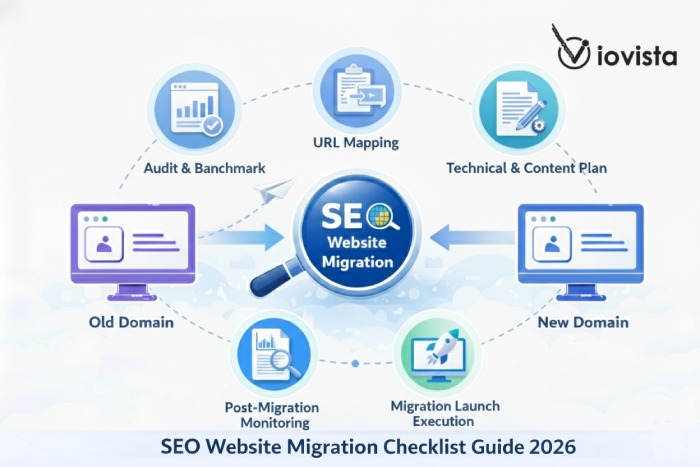
Each phase includes clear steps, practical checks, and downloadable templates you can use immediately. See the Migration workflow diagram above for a visual overview of how all phases connect.
The SEO Website Migration Checklist for 2026
If you’re planning a website migration and want to protect your rankings and traffic, use this simplified, end-to-end checklist as your reference point.
Before Migration (Plan & Protect)
- Audit Everything Before Migration: Inventory all URLs, benchmark keyword rankings, capture organic traffic & conversions, analyze backlinks, and record Core Web Vitals & mobile performance.
- Create a Complete URL Mapping: Map every valuable URL to its new destination using 1:1, server-side 301 redirects. Identify pages to consolidate, keep unchanged, or intentionally retire.
- Prepare Technical SEO in Advance: Lock down staging sites, plan XML sitemaps, migrate structured data, enforce HTTPS, confirm mobile-first readiness, and validate canonicals and hreflang.
Launch Day (Execute Precisely)
- Follow a Strict Pre-Launch Checklist: Remove noindex tags, activate redirects, confirm analytics & tracking, verify SSL, and test key pages immediately after go-live.
After Migration (Stabilize & Recover)
- Monitor Aggressively for the First 30 Days: Track indexing, crawl errors, rankings, traffic, Core Web Vitals, and backlinks daily, then fix issues as soon as they appear.
- Optimize for AI-Generated Answers (2026): Structure content clearly using FAQ & HowTo Schema, strengthen entity clarity, and write concise, citation-worthy explanations that AI systems can trust.
See the migration workflow diagram below for a visual overview of how all phases connect.
Phase 1: Pre-Migration Planning
The Foundation that Protects Your Rankings
If an SEO migration succeeds or fails, the outcome is almost always decided before launch day. Pre-migration planning is where rankings are either protected or quietly put at risk.
This phase alone is responsible for nearly 60% of migration success. When steps are skipped here, the result is rarely a short-term dip. Instead, sites experience long-term visibility loss, broken authority signals, and rankings that never fully recover.
Step 1: Audit Your Current SEO Performance
Before any website migration begins, you must clearly understand how your current site performs. This step establishes a baseline that protects existing performance and guides every decision in the migration process.
Full Site Crawl & URL Inventory
Crawl your entire website by using tools like Screaming Frog or Sitebulb. You must capture:
- All indexable URLs and non-indexable URLs (noindex, blocked, redirected)
- Status codes & canonicalized pages
- Pagination or parameter-based URLs
Every URL that currently receives traffic, rankings, or backlinks must be accounted for. Export all crawl data into a master spreadsheet. This becomes your single source of truth.
Keyword Rankings & Visibility Benchmark
Document how your site currently performs in search results:
- Primary keywords per page
- Current ranking positions
- SERP features (featured snippets, FAQs, AI Overviews)
- Separate brand from non-branded performance
2026 Consideration: AI-driven search systems increasingly prioritize topic clarity and authority over exact-match keywords.
Organic Traffic & Conversions Baseline
Use GA4 to capture historical performance:
- Organic sessions from the past 6-12 months
- Top organic landing pages
- Conversion events tied to organic traffic
- Revenue or lead attribution
Tag business-critical URLs separately so they receive extra attention in later phases.
Backlink Profile Snapshot
Capture:
- Total referring domains
- Top-linked pages
- Anchor text distribution
- High-authority backlinks pointing to deep URLs
If a highly linked page changes URL without a proper redirect, that link equity is permanently lost.
Core Web Vitals & Mobile Readiness
Measure current technical performance:
- Largest Contentful Paint (LCP)
- Interaction to Next Paint (INP)
- Cumulative Layout Shift (CLS)
- Mobile usability issues
- Page speed difference between templates
Deliverable: A Baseline Benchmark Report Template (includes: complete URL inventory, top 100 keyword rankings with positions, 12-month traffic trends, backlink profile with authority scores, Core Web Vitals baseline, and template-level performance metrics) documents all audit findings.
Step 2: Create Your URL Mapping & Redirect Strategy

URL mapping is the single most critical technical task in any website migration. Even small mistakes can erase years of SEO equity in one launch.
Why URL Mapping Matters Most
Search engines treat URLs as unique entities. If a URL changes and is not handled correctly, its authority, rankings, and trust signals are effectively reset.
Redirect Decision Matrix
Evaluate each URL individually:
- 301 Redirect: Content moves or is renamed (default for most pages)
- 410 (Gone): Intentionally removed content with no replacement
- Consolidation Redirect: Multiple old URLs merged into one stronger page
- No Change: URLs remain identical but require validation at launch
Common Redirect Mistakes to Avoid
Never:
- Redirect everything to the homepage
- Create redirect chains (A → B → C)
- Use 302s for permanent moves
- Redirect to irrelevant pages
- Mix URL casing inconsistently
Server-Side Redirect Planning
Redirects must be implemented at the server level. For example:
Apache (.htaccess):
Redirect 301 /old-page.html https://www.example.com/new-page/
Nginx:
location /old-page.html {
return 301 https://www.example.com/new-page/;
}
Deliverable: A URL Mapping & Redirect Spreadsheet Template (includes columns for: old URL, new URL, redirect type [301/410/consolidate], monthly traffic data, backlink count, priority level [high/medium/low], implementation status, validation checkboxes, and reasoning notes) documenting every redirect decision.
Step 3: Prepare the Technical SEO Foundation
Before migrating the content, the technical foundation of the new site must be ready.
Staging Site Protection
The staging environment must never be indexed:
- Add noindex tags to all pages
- Block staging in robots.txt
- Use password protection
- Apply IP restrictions where possible
XML Sitemap Planning
- Maintain old sitemap until migration completes
- Prepare clean new sitemap with only final, indexable URLs
- Exclude redirected, canonicalized, & noindex pages
- Plan submission timing after launch
Structured Data Migration
Migrate and validate existing schema:
- Organization, Product, FAQ, Article schemas
- Remove outdated markup
- Ensure schema matches visible content
2026 Focus: Structured data helps AI systems extract trustworthy facts, not just search engines.
HTTPS & SSL Readiness
Confirm:
- Valid SSL certificate installed
- Forced HTTPS on all pages
- Resolved mixed content issues
- Updated canonical tags
- Protocol-aware redirects
Mobile-First & Core Web Vitals
Since Google uses mobile-first indexing, ensure your new site’s mobile version contains all important content and structured data. Verify:
- Mobile and desktop content parity
- Proper viewport setup
- Accessible navigation
- No hidden critical content on mobile
Optimize:
- Images, fonts, server response times
- Templates to avoid Core Web Vitals regression
- LCP under 2.5s, INP under 200ms, CLS under 0.1
Canonicals & Hreflang
- Use self-referencing canonicals
- Update to new URLs
- Ensure correct hreflang mapping (for international sites)
- Avoid conflicts with redirects
Deliverable: A Technical Readiness Checklist confirming all foundation elements are in place.
Step 4: Content & Metadata Migration Plan
Content migration is about preserving meaning, relevance, and search intent while improving clarity for modern search and AI systems.
Metadata Preservation
- Preserve high-performing title tags & meta descriptions
- Avoid unnecessary keyword changes
- Update only when intent changes
- Keep titles 50-60 characters, descriptions 150-160 characters
Internal Link Updates
- Update internal links to new URLs
- Remove links to redirected pages where possible
- Preserve contextual anchor relevance
- Ensure important pages maintain strong internal support
Image, Media & PDFs
- Preserve image filenames & alt text
- Compress assets before migration
- Ensure stable media URLs
- Convert high-value PDFs to HTML when appropriate
Structure Content for AI (2026 Focused)
Use:
- Clear headings that answer questions
- Explicit definitions at the start
- Logical topic flow
- Minimal marketing language
AI systems favor content that explains concepts clearly.
FAQ, HowTo & Entity Clarity
- Add FAQ schema where questions naturally exist (keep answers 40-60 words)
- Apply HowTo schema for step-by-step processes
- Maintain consistent naming for brands, products, & services
- Build strong topical clusters through internal linking
Example: If you run a SaaS company and are migrating your help documentation, ensure your product names remain consistent (e.g., always “Project Manager Pro,” not alternating between “Project Manager” and “PM Pro”).
Deliverable: A Content & Metadata Migration Plan ensuring clarity and authority preservation.
Step 5: Backup Everything & Set Up Tracking
The final planning step is risk management.
Backups
Create and verify:
- Full site files backup
- Complete database export
- Media library backup
- Configuration files backup
Store in multiple locations (local & cloud) and test restorability.
Data Exports & Tracking Setup
Export:
- GA4 data (past 12 months)
- Search Console performance data
- Backlink snapshots
- Index coverage reports
Configure on new site:
- Google Analytics 4 (GA4)
- Google Search Console
- Bing Webmaster Tools
- Event & conversion tracking
- Tag Manager implementation
Test tracking on staging to ensure no data gaps during transition.
Deliverable: A Backup & Tracking Verification Checklist.
Are you ready to start your migration? Download our Pre-Migration Planning Toolkit (Steps 1-5 templates, audit spreadsheet, redirect mapping tool, and technical checklist) to begin your preparation today.
Phase 1 Key Takeaways
- Pre-migration planning determines the majority of SEO migration outcomes
- Every existing URL must have a clearly documented destination
- Server-side 301 redirects are mandatory, not optional
- Technical readiness prevents most launch-day failures
- Clear benchmarks make post-migration recovery measurable & actionable
Phase 2: Migration Day Execution
The Critical Launch Window
Migration day is nerve-wracking, because small mistakes cause immediate harm. If you follow Phase 1, most problems are preventable. This phase focuses on final checks, flawless redirect execution, and fast verification.
Step 6: Pre-Launch Final Checklist
Run this checklist twice: 24 hours before launch and again at launch.
24-Hour Checks
- Review full URL mapping spreadsheet
- Confirm developer availability
- Confirm backup integrity
- Confirm rollback plan documented
Launch-Minute Checks
- [ ] Remove noindex, nofollow tags on production pages
- [ ] Replace staging robots.txt with live version
- [ ] Remove password protection from live site
- [ ] Upload & activate server-side redirect rules
- [ ] Push GA4 & Tag Manager containers live
- [ ] Ensure sitemap ready (submit after launch)
- [ ] Confirm SSL certificate active, no mixed-content warnings
- [ ] Quick UX check: homepage, top landing page, product page
Deliverable: Launch-minute sign-off sheet completed by responsible owners.
Step 7: Execute Redirects Properly
Redirects are the spine of an SEO migration.
Why Server-Side 301s are Mandatory
- 301s signal permanent move & pass link equity
- Server-side redirects are fast, reliable, & are understood by all crawlers
- They avoid client-side pitfalls that some bots may not follow
What NOT to Use
- JavaScript redirects (unreliable for crawlers)
- Meta refresh redirects (poor UX, weaker SEO)
- 302 temporary redirects (don’t use for permanent migrations)
Redirect Testing & Validation
Test a sample of 20-50 high-priority redirects:
- Use curl -I https://oldurl to check HTTP status codes
- Crawl the site after redirects are live to detect chains & loops
- Confirm both www and non-www variants redirect correctly
- Verify HTTPS is enforced
Internal Link Cleanup
Even with redirects in place:
- Update internal links to point directly to new URLs
- Update navigation, footer, and contextual links
- Avoid unnecessary redirect hops internally
Deliverable: Redirect validation report confirming proper implementation.
Step 8: Notify Search Engines & Go Live
Google Search Console Actions
- Domain Change: Use Change of Address tool (only for domain moves)
- Submit Sitemap: Upload new sitemap after launch
- Priority Indexing: Request indexing for top 20-30 pages (homepage, category pages, & top products)
Bing & Other Engines
- Add/verify new site in Bing Webmaster Tools
- Submit sitemap
- Update Yandex (if applicable for your market)
Update External Profiles
- Google Business Profile
- Social media bios (Facebook, LinkedIn, Twitter)
- Partner listings
- Email signatures
Immediate Post-Launch Testing
- Verify HTTP 200 on key pages, no 500s
- Check Search Console for crawling errors
- Spot-check schema with Rich Results Test
- Confirm GA4 real-time traffic
- Run Page Speed checks on top landing pages
Launch Log Documentation
Record:
- Exact launch time
- Who performed each step
- Any immediate issues
- Actions taken & time to resolution
Deliverable: Launch log with immediate post-launch action list.
Refer to the launch day timeline infographic for a visual guide for optimal timing and task sequencing.
Phase 2: Key Takeaways
- Migration-day mistakes cause immediate & visible SEO damage
- All noindex tags & staging restrictions must be removed before launch
- Redirects, tracking, & core UX flows must be tested before & after go-live
- Search engines should be notified promptly after launch
- Every launch action should be documented for accountability & recovery
Phase 3: Post-Migration Monitoring & Recovery

Phase 3 is where the migration either proves itself or reveals its problems. The first 30 days are critical.
Step 9: Monitor Performance (First 30 Days)
Week 1: Daily Checks
Monitor:
- Google Search Console: New errors, spikes in excluded pages, coverage changes
- 404 Errors: Review server logs for sudden increases
- Core Web Vitals: Monitor LCP, INP, CLS for regressions
- Traffic Baseline: Monitor GA4 for major drops in sessions or top landing pages
- Canonical/Redirect Validation: Sample high-priority URLs for correct 301s
Week 2-4: Trend Monitoring
Watch:
- 7- and 14-day rolling averages for sessions, impressions, & clicks
- Rankings & SERP features (featured snippets, rich results)
- Backlinks (spot lost referring domains)
- Engagement metrics (session duration, pages/session, conversion rates)
- Template-level Core Web Vitals
Dashboards & Alerts
Build a 30-Day Monitoring Dashboard Template (includes: daily organic traffic graph, top 20 landing pages performance, 404 error log with trends, Search Console impressions/clicks, Core Web Vitals distribution by template, top 30 keyword rankings tracker, and high-value redirect validation status) with configured alert rules.
Set alerts for:
- Organic traffic drop >20%
- Surge in 5xx errors
- New redirect chains detected
- Significant Core Web Vitals regression
- Sudden loss of top-linked page
Deliverable: Populated monitoring dashboard with daily/weekly views.
Step 10: Fix Issues Quickly
Common Issues & Solutions
Spike in 404s / Missing Pages
- Diagnose: Cross-reference 404 URLs with URL mapping & backlink snapshots
- Fix: Implement 1:1 301 to correct replacements or restore resources
- Timeline: Within 24 hours
Redirect Chains
- Diagnose: Use crawling tools to find multi-hop redirects
- Fix: Rewrite to single-hop 301s at server level
- Timeline: Within 48 hours
Ranking Drops
- Diagnose: Identify affected keywords/pages, check content/canonical changes, review backlink losses
- Fix: Resolve technical errors, revert unhelpful metadata edits, restore redirects
- Timeline: Investigate within 48 hours, implement fixes within 1 week
Issue-Resolution Workflow
- Detect (alert or dashboard flags issue)
- Triage (classify & assign severity)
- Fix (developer implements solution)
- Validate (re-crawl, check GSC, verify metrics)
- Document (log root cause & resolution)
Real Example: An eCommerce site redirected 847 product pages to their homepage during a Shopify migration. Within 3 weeks, organic revenue dropped 64%. After mapping each product to its correct category or replacement, recovery took 5 months. The lesson: spending 2 extra days on proper URL mapping would have saved $180K in lost revenue.
Step 11: Improve Visibility in AI-Generated Answers (2026)
Search is increasingly blended with AI summaries. With post-migration, you can actively reclaim visibility in AI-generated answers.
What AI-Generated Answers Are
AI-generated answers are concise summaries produced by models that surface direct answers from web sources, often without explicit page-level links (Google AI Overviews, ChatGPT, Perplexity).
Practical Steps to Win AI Visibility
FAQ & HowTo Schema
- Add succinct Q→A blocks (40-60 words per answer)
- Use HowTo schema for step-by-step processes
- Validate with testing tools
Write Citation-Worthy Content
- Produce concise, evidence-backed paragraphs
- Use sources, dates, & short lists
- AI models prefer direct, factual language
Entity Optimization & E-E-A-T
- Ensure consistent naming (products, services, & locations)
- Display author credentials (bios, experience, & case studies)
- Cite primary sources
- Demonstrate Experience explicitly (real examples, & outcomes)
Featured Snippets & Rich Results
- Structure top-of-page answers (one-sentence definition, bullet list, or small table)
- Use H2 questions with immediate answers
- Increase chances of snippet selection
Deliverable: An AI Visibility Optimization Checklist (includes: schema implementation tracker, target pages with Q&A blocks identified, author credential integration plan, content rewrite priorities for citation-worthiness, and monitoring rules for AI feature loss).
Phase 3: Key Takeaways
- The first 30 days largely determine long-term recovery
- Daily monitoring helps catch issues before they escalate
- Redirect errors & crawl issues must be resolved quickly
- AI visibility depends on structured, factual, & clearly written content
- Migration recovery is expected, panic is not
Common SEO Migration Mistakes to Avoid
Most SEO migration failures happen because of repeatable, well-known mistakes. Below are the top 10 mistakes, why they happen, the damage they cause, and how to fix them.
1. Redirecting All Pages to the Homepage
Why it happens: Teams rush implementation without full URL mapping.
SEO impact:
- Destroys page-level authority
- Loses rankings for long-tail keywords
- Can take 6-12 months to recover
Correct solution: Create 1:1 page-level redirects. Redirect to the most relevant category or topic page if an exact match doesn’t exist.
2. Using 302 (Temporary) Redirects Instead of 301
Why it happens: Misunderstanding redirect types or default server settings.
SEO impact:
- Link equity doesn’t fully transfer
- Old URLs may remain indexed
- Rankings recover slowly or not at all
Correct solution: Use 301 redirects for all permanent moves. Reserve 302s only for temporary situations.
3. Forgetting to Remove Noindex Tags After Launch
Why it happens: Staging site protections left in place during go-live.
SEO impact:
- Pages drop out of the index
- Traffic can collapse overnight
Correct solution: Before launch, verify no noindex tags are on any live pages, robots.txt allows crawling, and staging protections remain only on staging.
4. Migrating Without Complete URL Mapping
Why it happens: Underestimating site size or skipping documentation.
SEO impact:
- Missed redirects
- Unexplained 404 errors
- Lost authority with no fix path
Correct solution: Create a comprehensive URL mapping spreadsheet before migration. Every existing URL must have a documented outcome.
5. Ignoring Existing Redirects From Past Migrations
Why it happens: Previous redirects aren’t audited.
SEO impact:
- Redirect chains (A → B → C)
- Diluted link equity
Correct solution: Audit all existing redirects and update so every old URL points directly to the final destination.
6. Breaking Internal Link Structure
Why it happens: Teams rely on redirects instead of updating internal links.
SEO impact:
- Reduced crawl efficiency
- Slower page loads
- Weakened internal authority flow
Correct solution: Update all internal links to point directly to new URLs, don’t rely on redirects internally.
7. Migrating Without Full Backups
Why it happens: Confidence that “nothing will go wrong.”
SEO impact:
- No rollback option if errors occur
- Potential permanent data loss
Correct solution: Back up site files, databases, configuration files, and media assets. Store in multiple locations and verify restorability.
8. Not Monitoring After Launch
Why it happens: Teams assume the hard work is done.
SEO impact:
- Small issues snowball into major problems
- Errors go unnoticed
Correct solution: Commit to 30 days of active monitoring with daily check-ins week 1 and trend monitoring in weeks 2-4.
9. Not Updating High-Value External Backlinks
Why it happens: Assuming redirects are “good enough.”
SEO impact:
- Missed opportunity to preserve maximum link equity
- Risk of external sites removing “broken” links
Correct solution: Identify top referring domains and politely request link updates to new URLs.
10. Migrating at the Worst Possible Time
Why it happens: Business pressure to launch quickly.
SEO impact:
- Revenue loss during peak season
- No buffer time for fixes
Correct solution: Migrate during low-traffic periods. Avoid holidays, sales events, and peak business cycle
Tools & Templates
A successful SEO migration depends on the right tools and repeatable templates.
Essential Tools
Free Tools:
- Google Search Console: Indexing, coverage, performance, & issue detection
- GA4: Traffic, landing pages, conversions, & anomaly detection
- PageSpeed Insights: Core Web Vitals & performance diagnostics
- Bing Webmaster Tools: Supplemental indexing & crawl insights
Paid Tools:
- Screaming Frog or Sitebulb: Full site crawls, redirect validation, & canonical checks
- Ahrefs / Semrush: Backlink audits, keyword benchmarks, & rank tracking
Monitoring Stack:
- Looker Studio dashboard (GA4 & GSC unified view)
- GSC alerts (coverage errors, indexing anomalies)
- CWV field data (track by template post-launch)
7 Downloadable Templates
- SEO Migration Master Checklist: Comprehensive phase-by-phase task list with checkbox format, priority flags, & responsible owner columns
- URL Mapping & Redirect Spreadsheet: Includes, old URL, new URL, redirect type, traffic data, backlink count, priority ranking, implementation status, & validation columns
- Pre-Migration Baseline Benchmark Report: Complete URL inventory, top 100 keyword rankings with positions, 12-month traffic trends, backlink profile with authority scores, & Core Web Vitals baseline
- Technical Readiness Checklist: Staging protection verification, sitemap preparation, schema validation, HTTPS/SSL confirmation, & mobile-first compliance tracker
- Content & Metadata Migration Plan: Metadata preservation tracker, internal link update log, image/media migration checklist, & AI-readiness scorecard
- 30-Day Post-Migration Monitoring Dashboard: Daily organic traffic graph, top 20 landing pages, 404 error log, Search Console impressions/clicks, Core Web Vitals distribution, & keyword ranking tracker
- AI Visibility Optimization Checklist: Schema implementation tracker, Q&A block identification, author credential plan, content rewrite priorities, & AI feature monitoring
See the migration tool stack infographic for a quick reference guide to which tools to use and when.
Recovery Timeline & Expectations
SEO migrations rarely recover overnight. Understanding what is normal versus concerning prevents overreaction.
Week 1-2: Initial Fluctuation
What happens:
- Short-term volatility is expected
- Rankings may bounce daily
- Some pages may temporarily disappear
- Organic traffic can dip or spike
Normal: Keyword position swings, delayed indexing, & minor traffic drops (10-20%)
Red flags: Widespread deindexing, sustained 404 spikes, & critical pages missing entirely
Week 3-4: Stabilization Phase
What happens:
- Search engines consolidate signals
- Redirect equity transfers
- Traffic trends level out
Normal: Partial recovery, & mixed keyword movement
Red flags: Continued decline, loss of top-performing URLs, & unresolved redirect chains
Month 2-3: Recovery Phase
What happens:
- Most sites regain large portion of pre-migration visibility
- Rankings stabilize
- Traffic rebounds
- Conversions return closer to baseline
Normal: Gradual upward trend
Red flags: Flat or declining trends with no technical errors
Month 4-6: Full Normalization
What happens:
- Signals fully settle
- Many sites match or exceed pre-migration performance
Normal: Steady growth
Red flags: Persistent losses indicating structural or strategic mistakes
The recovery timeline chart shows typical progress markers at each phase.
Conclusion: Your SEO Migration Success Plan
A successful SEO website migration is rarely about clever tricks or last-minute fixes. It’s about discipline, preparation, and follow-through.
The core principles are simple:
Planning Beats Panic: A complete audit, documented URL mapping, technical preparation, & backups prevent most migration disasters before they happen.
Execution Beats Shortcuts: Clean server-side 301 redirects, careful launch checks, & proper search engine notifications protect the SEO value you’ve already earned.
Monitoring Beats Assumptions: Rankings & traffic don’t recover automatically. Active monitoring in the first 30 days allows you to fix small issues before they turn into long-term losses.
When these principles are followed, migrations become controlled, predictable projects, not SEO emergencies.
Your Next Steps
- Complete your pre-migration audit & benchmark report
- Build a full URL mapping & redirect plan
- Prepare your technical foundation & backups
- Execute the launch using a strict checklist
- Monitor & fix issues aggressively for 30 days
Download the free SEO Migration Toolkit (all 7 templates, checklists, monitoring dashboards, & issue-resolution logs) and start your migration with confidence.
Frequently Asked Questions
How long does SEO recovery usually take after a website migration?
Most well-executed migrations see 80%-90% recovery within 2-3 months, with full stabilization by 4-6 months. Smaller sites with strong authority and clean redirects may recover faster, while complex or error-prone migrations take longer.
Will I lose traffic during a website migration?
Some short-term fluctuation is normal. A 10-20% change in the first few weeks is common as search engines process redirects and new URLs. Large or sustained drops usually indicate technical issues that need fixing.
What’s the difference between a 301 and a 302 redirect?
A 301 redirect signals a permanent move and passes SEO value to the new URL. A 302 redirect is temporary and does not transfer full authority. For migrations, 301 redirects should always be used.
Do I need to redirect every page?
Yes. Every valuable URL should have a specific, relevant redirect. Redirecting all pages to the homepage or skipping low-traffic URLs leads to lost rankings and poor user experience.
How do I prevent my staging site from being indexed?
Use multiple safeguards: noindex/nofollow meta tags, robots.txt disallow rules, and password protection. Never add staging sites to Google Search Console.
How do I optimize for AI Overviews during migration?
Structure content clearly, use FAQ and HowTo schema, write concise answers (40-60 words), and maintain strong internal linking and entity consistency. Clear structure helps AI systems extract accurate summaries.
When should I hire SEO migration experts?
Consider experts if your site has 1,000+ pages, complex eCommerce setups, international targeting, or high revenue risk. Professional guidance reduces costly mistakes in complex migrations.
What should I do if traffic hasn’t recovered after 6 months?
Run a full post-migration audit: verify redirects and canonicals, check for noindex or crawl blocks, and review Search Console coverage. If issues persist, bring in a migration specialist immediately.
Is it possible to improve SEO during a migration?
Yes. Migrations can improve performance if they fix technical debt, improve site speed, and clarify content structure, provided SEO fundamentals are preserved.
What’s the single biggest migration mistake to avoid?
Redirecting all pages to the homepage. This destroys page-level authority and causes long-term ranking losses.
Mike Patel


Mike Patel is the Founder and CEO of ioVista, a leading digital commerce agency specializing in eCommerce solutions. With a strong background in business and technology, Mike Patel has been at the forefront of driving digital transformations for businesses. He has successfully navigated the ever-changing landscape of eCommerce, helping companies leverage the power of online platforms to grow their brand, increase revenues, and optimize their digital presence. Under his leadership, ioVista has become a trusted partner with major technology companies: Adobe/Magento, Google, BigCommerce, Shopify, and Yahoo. He is dedicated to staying ahead of industry trends, adopting cutting-edge technologies, and continuously improving strategies to provide clients with a competitive edge. Mike’s commitment to excellence and client satisfaction is evident in every project ioVista undertakes.
Popular Posts
-
Adobe Commerce
Adobe Commerce APSB26-92: Security Risks, Affected Versions, and Next Steps
Albert Wood
13 Aug 2026 -
-
News
How ShopWare and ioVista are Driving Digital Transformation in the 2A Community!
Aaron Pallares
04 Aug 2026 -
News
Why ioVista Became a Shopware Partner: Building the Future of Digital Commerce Through Innovation and Collaboration
Aaron Pallares
28 Jul 2026 -
Adobe Commerce, Magento, Update
Critical Adobe Commerce Security Update APSB26-73: Key Highlights
Mike Patel
15 Jul 2026 -
AI and ML, Google Updates
Google Marketing Live 2026: Everything You Need to Know about Google's AI Advertising Revolution
Mike Patel
16 Jun 2026 -
Adobe Commerce
Critical Adobe Commerce Security Update APSB26-49: Key Highlights
Mike Patel
15 May 2026 -
Adobe Commerce
Adobe Commerce 2.4.9 is Here: Features, Security, and Platform Enhancements
Mike Patel
15 May 2026 -
-
-
-
AI and ML, AIO, B2B
Machine-Readable B2B: The Hidden Layer that Wins AI Visibility
Mike Patel
14 Apr 2026 -
B2B
AI-Ready Catalogs: Turning Your Product Data into a Recommendation Engine
Mike Patel
09 Apr 2026 -
-
-
AIO, SEO
LLM Optimization: How Large Language Models Discover, Rank, and Cite Content
Mike Patel
26 Mar 2026 -
Migration, SEO
SEO Website Migration Checklist: Guide to Protect Your Rankings & Traffic in 2026
Mike Patel
13 Mar 2026 -
Adobe Commerce, Update
Adobe Commerce Security Update APSB26-05: Everything You Need to Know
Mike Patel
12 Mar 2026 -
AIO, SEO
LLM SEO vs GEO vs SEO: What Actually Matters for eCommerce Brands in 2026
Mike Patel
12 Mar 2026 -
Adobe Commerce
Are You Still on Adobe Commerce 2.4.6? Now is the Time to Upgrade
Mike Patel
24 Feb 2026 -
-
-
-
-
AI and ML, SEO
AI-SEO Is Changing Everything in 2026: 5 Strategies to Rank and Stay Relevant
Mike Patel
10 Dec 2025 -
-
E-Commerce
What SEMA 2025 Revealed: The Digital Transformation Race in the Automotive Aftermarket Industry
Mike Patel
20 Nov 2025 -
Adobe Commerce
Most Exciting Update: Hyvä Theme is Now Open Source and FREE
Paren Sutreja
17 Nov 2025 -
News, Shopify
Breakthrough Update: Managing Product Variants on Shopify Got Easier with 2048 Variants
Mike Patel
11 Nov 2025 -
Adobe Commerce, Update
Critical Adobe Commerce Vulnerability (CVE-2025-54236): What Merchants Need to Know
Mike Patel
27 Oct 2025 -
Adobe Commerce, Update
Adobe Commerce Security Update APSB25-94: What You Need to Know
Mike Patel
15 Oct 2025 -
Shopify
The Quiet Revolution: Why the Shopify x ChatGPT Partnership Changes Everything in eCommerce
Mike Patel
03 Oct 2025 -
Adobe Commerce
Adobe Sensei AI in eCommerce 2025: Transforming Digital Commerce
Mike Patel
19 Sep 2025 -
Adobe Commerce
Critical Adobe Commerce Security Update APSB25-88: Key Highlights
Mike Patel
10 Sep 2025 -
Shopify
Shopify API Deprecations and New Features: A Merchant's Guide to Upcoming Changes
Mike Patel
08 Sep 2025 -
AI and ML
Agentic AI for Business - Drive Success with Intelligent Automation
Mike Patel
27 Aug 2025 -
Adobe Commerce, Update
Adobe Commerce Security Update APSB25-71: Essential Security Fixes You Need to Know
Mike Patel
13 Aug 2025 -
News, Shopify
Shopify Summer Edition 2025: A Technical Insight into the Latest Update
Mike Patel
08 Aug 2025 -
-
Adobe Commerce, Magento
Adobe Commerce Security Update APSB25-50: Key Highlights
Mike Patel
11 Jun 2025 -
Adobe Commerce, B2B, E-Commerce
B2B Excellence Starts with Adobe Commerce (Magento) - Not WooCommerce
Mike Patel
03 Jun 2025 -
AI and ML, B2B, Digital Marketing, E-Commerce, Web Development
AI and ML in B2B: A Vision for the Future of Commerce by 2025
Mike Patel
27 May 2025 -
B2B, Digital Marketing, E-Commerce, Web Development
20 Next-Gen B2B eCommerce Features that will Dominate in 2025
Mike Patel
20 May 2025 -
B2B, BigCommerce, E-Commerce, Web Development
WooCommerce to BigCommerce Migration Fuels Your B2B eCommerce Growth
Mike Patel
06 May 2025 -
Adobe Commerce, E-Commerce, Migration, News, Web Development
Adobe Commerce SaaS: How Will It Empower Your eCommerce Business?
Mike Patel
22 Apr 2025 -
B2B, E-Commerce, Web Development
Leverage ERP Integration to Scale Your B2B eCommerce Business in 2025
Mike Patel
15 Apr 2025 -
Adobe Commerce, E-Commerce, Magento, News, Web Development
Adobe Commerce Security Update APSB25-26: All You Need to Know
Mike Patel
10 Apr 2025 -
Adobe Commerce, E-Commerce, Magento, News, Web Development
Adobe Commerce 2.4.8 Release: Key Highlights
Mike Patel
10 Apr 2025 -
B2B, E-Commerce, Migration, Web Development
Why Scaling Business Should Migrate WooCommerce Stores to Shopify
Mike Patel
08 Apr 2025 -
Adobe Commerce, B2B, E-Commerce, Magento, Web Development
Why Does Adobe Commerce (Magento) Lead the Way of B2B eCommerce
Mike Patel
18 Mar 2025 -
B2B, Digital Marketing, E-Commerce, Web Development
Gain a Competitive Edge by Turning Obstacles into Opportunities: B2B Digital Transformation in 2025
Mike Patel
11 Mar 2025 -
AI and ML, B2B, Digital Marketing, E-Commerce, Web Development
10 Key Drivers of Digital Transformation in B2B eCommerce for 2025
Mike Patel
04 Mar 2025 -
B2B, E-Commerce, Web Development
5 Leading eCommerce Platforms to Build Scalable B2B Customer Portals
Mike Patel
25 Feb 2025 -
Google Updates, News, SEO
Google Search Ranking Volatility: All You Need to Know
Mike Patel
18 Feb 2025 -
Adobe Commerce, E-Commerce, Magento, News, Web Development
Adobe Commerce Security Update APSB25-08: All You Need to Know
Mike Patel
13 Feb 2025 -
B2B, E-Commerce, Web Development
7 Strategic Benefits of an Online B2B Customer Portal
Mike Patel
11 Feb 2025 -
B2B, E-Commerce, Web Development
What Makes a Great Online B2B Customer Portal? Top 10 Features to Know
Mike Patel
04 Feb 2025 -
B2B, E-Commerce, Web Development
Legacy B2B eCommerce Systems Slowing You Down? It's Time for Modernization
Mike Patel
28 Jan 2025 -
B2B, E-Commerce, Manufacturing, Migration, Web Development
80% of B2B Businesses Are Holding You Back by Legacy eCommerce Systems. Is Yours One of Them?
Mike Patel
15 Jan 2025 -
B2B, E-Commerce, Manufacturing, Web Development
Essential B2B Commerce Features for 2024
Mike Patel
20 Nov 2024 -
Adobe Commerce, E-Commerce, Magento, News, Web Development
Security Update Available for Adobe Commerce | APSB24-90
Albert Wood
20 Nov 2024 -
Adobe Commerce, E-Commerce, Magento, News
Why Choose Hyvä Enterprise for Your Adobe Commerce Store?
Paren Sutreja
19 Nov 2024 -
Adobe Commerce, E-Commerce, Magento, News
Security Update APSB24-73 for Adobe Commerce: Everything You Need to Know
Albert Wood
14 Oct 2024 -
Adobe Commerce, E-Commerce, Magento, News, Web Development
CosmicSting Exploit Still Poses a Threat
Albert Wood
25 Jul 2024 -
Adobe Commerce, E-Commerce, Magento, News
CosmicSting: Unauthorized XXE Vulnerability
Albert Wood
17 Jul 2024 -
Adobe Commerce, E-Commerce, Magento, News
Hyvä Theme for Magento 2: Uncover Powerful Features – Evaluate Pros and Cons
Paren Sutreja
16 Jul 2024 -
Adobe Commerce, Magento, News, Web Development
Magento 2.4.7: Explore the Newest Enhancements and Features
Albert Wood
30 Apr 2024 -
Adobe Commerce, Magento, News, Web Development
Magento 2.4.6-p5: Enhancing Stability and Security
Mike Patel
22 Apr 2024 -
-
Digital Marketing, E-Commerce, SEO
The Impact of Site Speed on eCommerce SEO Performance
Mike Patel
14 Feb 2024 -
Awards & Recognition, B2B, BigCommerce, E-Commerce, Manufacturing, Web Development
ioVista Attains B2B Specialization on BigCommerce
Albert Wood
30 Oct 2023 -
Adobe Commerce, BigCommerce, Digital Marketing, E-Commerce, Magento, SEO
5 Ways to Boost eCommerce Sales in 2024
Mike Patel
21 Sep 2023 -
Adobe Commerce, Awards & Recognition, B2B, E-Commerce, Magento, Manufacturing, Web Development
It’s Official: ioVista Has Become a Recognized Adobe Specialized Partner
Albert Wood
05 Sep 2023 -
Adobe Commerce, E-Commerce, Magento, News, Web Development
Magento 2.4.7-beta1 Release
Mike Patel
15 Aug 2023 -
-
Awards & Recognition, B2B, E-Commerce, Manufacturing, Web Development
ioVista Announced as a 2023 Local Excellence Award Winner by UpCity
Albert Wood
09 May 2023 -
Digital Marketing, E-Commerce, News
Google Analytics 4: What You Need To Know
Albert Wood
29 Mar 2023 -
Adobe Commerce, E-Commerce, Magento, News, Web Development
Adobe Commerce 2.4.6 Release
Mike Patel
13 Mar 2023 -
Adobe Commerce, E-Commerce, Magento, Web Development
Questions You Should Ask Your Magento Agency
Albert Wood
17 Feb 2023 -
B2B, Digital Marketing, E-Commerce, Manufacturing, Web Development
7 Proven Strategies to Increase B2B/Wholesale eCommerce Revenue
Mike Patel
01 Feb 2023 -
Digital Marketing, E-Commerce
10 eCommerce Trends to Increase your Sales in 2023
Albert Wood
12 Jan 2023 -
B2B, E-Commerce, Manufacturing, Web Development
B2B eCommerce Features Your Store Need in 2023
Albert Wood
05 Jan 2023 -
Adobe Commerce, E-Commerce, Magento, News, Web Development
Adobe/Magento Highlights 2022 - Is your store Up-to-Date
Mike Patel
20 Dec 2022 -
BigCommerce, E-Commerce, News, Web Development
BigCommerce Releases StagingPro for Enterprise Merchants and Agency Developers
Albert Wood
15 Dec 2022 -
Adobe Commerce, E-Commerce, Magento, News, Web Development
Adobe discontinues Support for the 2.4.0-2.4.3 Release Line
Mike Patel
09 Dec 2022 -
-
Digital Marketing, E-Commerce, News
Universal Analytics Going Away: What Does it Mean, What you need to Do?
Albert Wood
24 Nov 2022 -
Adobe Commerce, E-Commerce, Magento, News
40% of Magento and Adobe Commerce Websites at Risk in November 2022
Albert Wood
17 Nov 2022 -
E-Commerce, Web Development
Website Support: How Can ioVista Help keep your Store Up and Running During Holidays
Mike Patel
17 Nov 2022 -
Awards & Recognition, B2B, E-Commerce, Manufacturing, News
ioVista Awarded the Best B2B Company 2022
Albert Wood
04 Nov 2022 -
Adobe Commerce, Magento, News
Adobe Releases Critical Security Patches for Magento 2.4.5 and 2.4.4
Albert Wood
27 Oct 2022 -
-
E-Commerce, News
ioVista is Sponsoring the Largest eCommerce Event in Dallas
Albert Wood
07 Oct 2022 -
Adobe Commerce, E-Commerce, Magento, News
Magento 2 Vulnerability: Surge in Hacking on Unpatched Stores
Mike Patel
27 Sep 2022 -
B2B, Digital Marketing, E-Commerce
Get your Holiday eCommerce Marketing Started with These 5 Tips
Albert Wood
15 Sep 2022 -
Adobe Commerce, B2B, E-Commerce, Magento
Why a Magento Code Audit is Essential for your eCommerce Store
Mike Patel
10 Sep 2022 -
-
-
B2B, BigCommerce, E-Commerce
How BigCommerce makes it easy for Legacy Businesses to get started with B2B eCommerce
Mike Patel
23 Aug 2022 -
B2B, E-Commerce, Manufacturing
The Challenges of eCommerce in Manufacturing and How to Overcome Them
Mike Patel
17 Aug 2022




































Let’s work together to create outstanding digital experiences.
With 20+ years of industry experience, ioVista understands your eCommerce needs and delivers best-in-class solutions that help you gain a competitive edge.
or Call us at: +1 214-699-4391

TOP
Get in Touch