


Up to 8% More Sales in 90 Days: How to Earn Google’s Top Quality Store Badge
20 Nov 2026
 Albert Wood

Many small and midsize eCommerce businesses struggle to generate consistent orders, even though they’re offering high-quality products.
One potential reason is a lack of customer trust.
Customers may be more willing to purchase from brands they trust. However, shoppers may hesitate to purchase from an unfamiliar brand due to uncertainty about product quality, shipping terms, pricing, payment options, return and refund policy, and more.
Earning “Google’s Top Quality Store Badge” may help build shopper confidence as a top-quality store on Google. Moreover, by installing the store widget on your website, you can experience an increase in your orders.
Are you ready to understand how “Google’s Top Quality Store Badge” impacts your sales?
Let’s begin.
What is the Google Top Quality Store Badge?
Google recognizes merchants with the Google Top Quality Store Badge only if they meet specific performance criteria, including excellent customer experience and reliability. This badge appears alongside your store’s listing on Google Shopping. It signals that your store meets Google’s quality standards and builds customer trust.
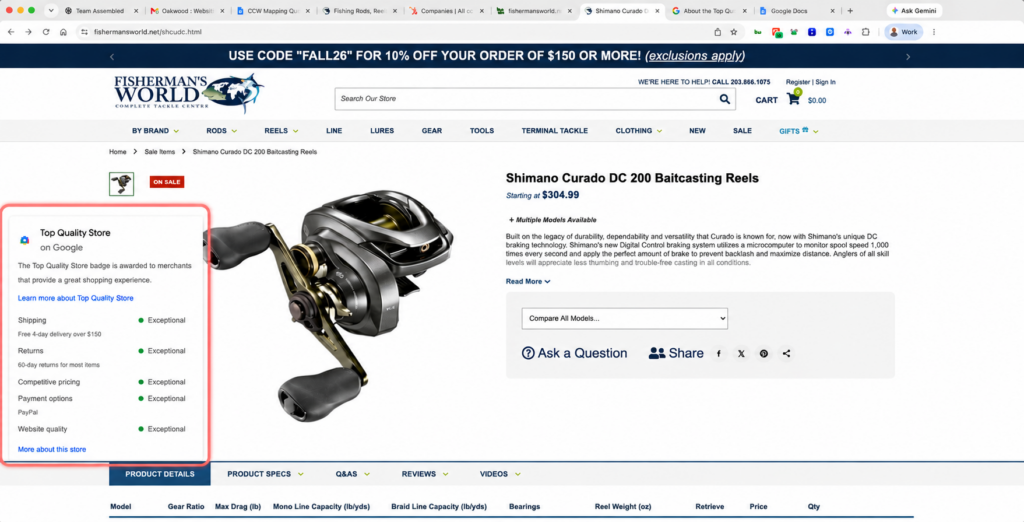
How Google Evaluates Who Deserves the Top Quality Store Badge
To earn this badge, merchants need to ensure their stores meet the criteria listed below, as defined by Google.
- High-Quality Products: Offer products that meet or exceed customer expectations. Ensure the product descriptions, specifications, and images are real and accurate.
- Reliable Customer Service: Provide timely customer support to address shoppers’ questions and resolve issues.
- Positive Customer Reviews: Encourage authentic reviews and ratings from customers that reflect your consistent service and quality.
- Reliable Shipping and Delivery: Ensure accurate and timely order fulfillment by providing shoppers with real-time tracking. Provide realistic delivery estimates and work to meet them consistently.
- Compliance with Google Policies: Fulfill all the terms and conditions of Google Merchant Center policies and guidelines to maintain a transparent and trustworthy business presence.
Can the Store Widget Really Boost Sales? Google Says Up to 8% in 90 Days
According to Google Search Central, businesses that apply the store widget on their websites saw up to 8% higher sales within 90 days compared to similar businesses without it. Here’s how the widget may help shoppers make purchasing decisions.
Why Store Quality Signals Build Shopper Confidence
Before making a buying decision, the key questions customers ask are:
- How quickly will the product arrive?
- What is the product return and refund policy?
- Is this online store legitimate and trustworthy?
If you earn the badge and display the store widget on your product pages, it will address all their questions.
This third-party validation helps buyers feel more confident when purchasing from your online store.
Where to Display the Store Widget
Google automatically displays the appropriate widget from the three options below based on your store’s eligibility.
3 Google Store Widget Tiers for Different Store Quality Levels
1. Top Quality Store Widget
Google’s Top Quality Store widget is the strongest trust signal that displays your high rating across all five areas.
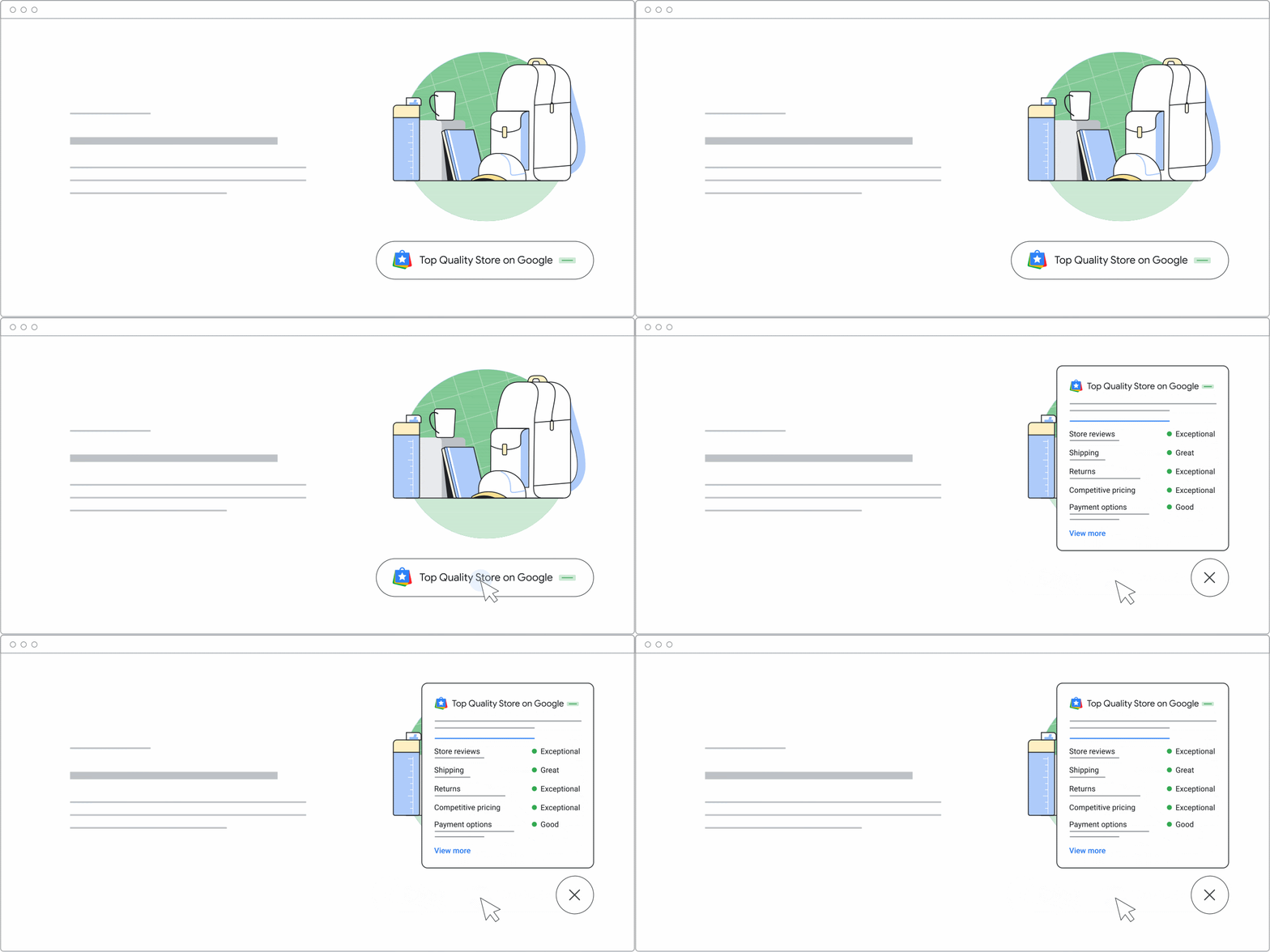
Top Quality Store Widget
2. Store Rating Widget
This badge is shown to stores that have not yet earned Top Quality status. The Store Rating widget highlights the merchant’s Google store rating and customer reviews.

Store Rating Widget
3. Generic Store Widget
This widget applies to stores that have not earned ratings yet. It still displays relevant store information, such as shipping and return policies, to help shoppers make informed decisions.
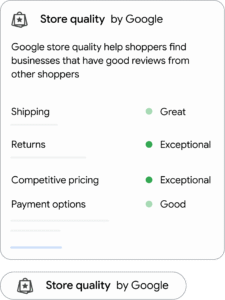
Generic Store Widget
How the Widget Adapts as Your Store Improves
You install the code once. As your store quality improves, the widget upgrades itself from the generic store widget to Store Rating to Top Quality Store, with no code changes.
That means there’s no reason to wait for the badge before installing. Eligible merchants can install the widget and allow its display to reflect changes in store quality status.
How Google Decides Who Earns the Badge
Every store with an active Merchant Center account and approved products is automatically enrolled in Google’s Store Quality program. To earn the badge, your store must rank “Exceptional” in its overall quality score. Google measures five signals, and your store rating is shown alongside them:
| Category | What Google Measures | Quick Win |
| Shipping | Delivery speed and delivery cost | Add both shipping speed and cost in Merchant Center, not cost alone |
| Returns | Return window and return cost | Publish a clear return window and state who pays for returns |
| Pricing | How your prices compare with other sellers | Keep feed prices accurate and matched to your site |
| Payment options | E-wallets offered: PayPal, Google Wallet, Apple Pay, and Amazon Pay | Add any missing wallets at checkout |
| Website quality | Desktop and mobile site speed, browsing and purchase experience | Fix slow pages and checkout friction |
| Reviews | Your Google store rating | Enable Google Customer Reviews to collect post-purchase ratings |
Note: Changes take time to register. Policy updates, such as a new return window, can take up to 30 days to appear in your score, and stores can gain or lose the badge as their data changes.
How to Check Your Google Store Quality Status and Install the Widget
Step 1: Check Your Store Quality Score in Merchant Center
Sign in to Google Merchant Center and open Store Quality. You’ll see your overall score, your badge status, and a rating for each category.
Step 2: Improve Store Quality Ratings
Start with any category rated below “Exceptional”. Missing shipping speed, unclear return costs, and slow mobile pages are the most common gaps. Analyze the specific gaps in your store and fix them quickly.
Step 3: Add the Store Widget to Your Website
Copy the widget code snippet from Google’s help documentation and add it inside the <head> section of your site’s HTML. Your pages must use the HTML5 DOCTYPE. Installation time depends on the website’s platform and configuration.
Step 4: Test the Widget Across Devices
Confirm the widget loads and opens correctly on desktop and mobile. Check that it doesn’t cover your add-to-cart button or chat tools.
Common Google Store Widget Installation Mistakes
- Losing the Code After a Theme Change: A new theme or template can drop the widget without warning. Recheck after every site update.
- Removing the Old Badge Code: Don’t remove the legacy Google Customer Reviews badge. It upgrades automatically to the new store widget, so leave the old code in place.
- Installing Before Fixing Weak Ratings: The widget shows your scores publicly, so fix low-rated categories first.
- Covering Key Buttons: On mobile, a poorly placed widget can block checkout or chat elements.
- Expecting Instant Results: Score changes can take up to 30 days to update.
How ioVista Turns Your Store Quality Score into Sales
Earning Google’s Top Quality Store badge depends on meeting Google’s applicable eligibility and store quality requirements. ioVista handles both the Merchant Center side and the website side and ensures all the key aspects that impact the store quality are achieved and maintained, including:
- Merchant Center Setup: Complete and accurate shipping and return data, so Google scores you on real performance.
- Feed Management: Accurate and competitive pricing synced between your feed and your site.
- Site Speed and UX Work: Faster pages and smoother checkout on Adobe Commerce/Magento, Shopify, BigCommerce, WooCommerce, and Shopware.
- Checkout and Payment Integrations: Integrate all the leading payment methods, including PayPal, Google Wallet, Apple Pay, Amazon Pay, and more for a seamless and secure checkout.
- Google Customer Reviews Setup: Post-purchase review requests that build your store rating.
- Widget Installation and Monitoring: Correct placement on every eCommerce platform, plus ongoing checks so your badge isn’t lost after an update.
- Credibility: ioVista is a Google Partner that has built and grown eCommerce stores for B2B and B2C brands since 2004.
Partner with ioVista to improve your Google Store Quality Score, address gaps across Merchant Center and your eCommerce website, and work toward earning and maintaining the Top Quality Store Badge. Get in touch to discuss your store’s current performance and identify opportunities to improve customer trust and drive more sales.
Frequently Asked Questions (FAQs)
What is the Top Quality Store badge on Google?
The Top Quality Store badge is Google’s recognition for online stores with an exceptional shopping experience. Google rates shipping, returns, pricing, payment options, and website quality. Top-rated stores display the badge on Google and their own websites.
How do I get the Top Quality Store badge on Google?
You need a Google Merchant Center account with approved products, which enrolls you automatically. To earn the badge, your store must rank “Exceptional” in its overall quality score.
What does Google measure for store quality?
Google measures shipping speed and cost, return window and cost, desktop and mobile site speed, and accepted e-wallets (PayPal, Google Wallet, Apple Pay, and Amazon Pay). Your Google store rating and price competitiveness also count.
Does the Google store widget increase sales?
Yes. Google reported that businesses using the store widget saw up to 8% higher sales within 90 days compared with similar businesses without it, because Google-verified trust signals reassure shoppers before they buy.
How do I add the Google store widget to my website?
Copy the widget code snippet from Google’s help documentation and add it inside the <head> section of your website’s HTML. Then test it on desktop and mobile, and recheck after any theme change.
Can I show the Google store widget if I’m not a Top Quality Store?
Yes. Google offers three widget tiers: Top Quality Store, Store Rating, and the generic store widget for stores still building their reputation. The widget upgrades automatically as your store quality score improves.
Why did I lose my Top Quality Store badge?
Google evaluates the stores daily, so slower site speed, weaker shipping or return policies, or falling ratings can cost you the badge. Policy changes can take up to 30 days to reflect in your score.
Is the Google Top Quality Store badge free?
Yes. Google’s Store Quality program is available to eligible merchants at no charge. Google evaluates stores automatically through Google Merchant Center based on customer experience signals, reviews, shipping, returns, and website quality.
How long does it take to earn Google’s Top Quality Store badge?
There is no fixed timeline for earning the badge. Google evaluates store performance daily, but improvements may take several weeks to appear because of its review period, data availability, and overall quality requirements.
What’s the difference between the Top Quality Store badge and Google’s store widget?
The Top Quality Store badge recognizes merchants that meet Google’s quality standards. The store widget is an embeddable website element that displays relevant store quality information, ratings, and reviews based on the merchant’s eligibility.
Can I install Google’s store widget on Shopify, BigCommerce, or Adobe Commerce (Magento)?
Yes. Google’s store widget can be embedded on supported eCommerce websites using its provided code. Shopify, BigCommerce, and Adobe Commerce (Magento) stores can integrate it, although implementation steps may vary by platform and theme.
Albert Wood


Albert Wood is an accomplished eCommerce Business Analyst. As a technology futurist and sales motivator at ioVista, Albert is dedicated to transforming struggling eCommerce businesses into thriving enterprises. With a keen focus on client’s business processes, user experience (UX), and leveraging the power of digital marketing, he helps businesses optimize their online presence and drive sustainable growth. Albert’s passion is for virtual reality (VR), augmented reality (AR), and mixed reality (MR), immersing himself in unforgettable experiences and exploring the limitless possibilities they offer. His enthusiasm for these emerging technologies fuels his drive to push the boundaries of innovation in eCommerce.
Popular Posts
-
Google Updates
Up to 8% More Sales in 90 Days: How to Earn Google’s Top Quality Store Badge
Albert Wood
20 Nov 2026 -
Adobe Commerce, BigCommerce, Magento
Black Friday 2026 Readiness Checklist for Adobe Commerce, Shopify, BigCommerce & Shopware
Albert Wood
18 Nov 2026 -
Awards & Recognition
From Fitment to the Finish Line: Automotive eCommerce Lessons from AAPEX and SEMA 2026
Chloe Lapina
17 Nov 2026 -
Adobe Commerce
Adobe Commerce 2.4.4/2.4.5 End of Support: Upgrade or Replatform? A Decision Guide
Albert Wood
13 Nov 2026 -
-
AIO, B2B, BigCommerce, Magento, Shopify
eCommerce Platform Migration SEO: Shopify, Magento and BigCommerce URL Mapping Guide
Chloe Lapina
28 Oct 2026 -
-
Update
PHP2Shell: What eCommerce Merchants Need to Know About CVE-2026-109618 and CVE-2026-109619
Albert Wood
22 Oct 2026 -
Adobe Commerce, Update
Adobe Commerce APSB26-153: Security Risks that Require Merchant Attention
Albert Wood
14 Oct 2026 -
-
News
International Manufacturing Technology Show: What Manufacturing Taught Us About Technology, Change and the Future
Aaron Pallares
29 Sep 2026 -
B2B, BigCommerce
BigCommerce B2B Edition Explained: Features, Pricing and Fit
Mike Patel
21 Sep 2026 -
BigCommerce, Migration, Shopify
BigCommerce vs. Shopify for B2B: A 2026 Decision Guide
Albert Wood
18 Sep 2026 -
AI and ML, AIO, B2B, E-Commerce
The Role of AI in Modern eCommerce: A B2B and B2C Guide
Mike Patel
16 Sep 2026 -
Shopify
Do You Need a Shopify Agency? A Guide for Growing B2B & D2C Businesses
Aaron Pallares
14 Sep 2026 -
Update
Adobe Commerce APSB26-138: What Businesses Need to Know About the Security Update
Albert Wood
10 Sep 2026 -
Adobe Commerce
Adobe Commerce APSB26-146: Critical Security Fixes Require Urgent Action
Albert Wood
08 Sep 2026 -
Adobe Commerce, SEO
Magento 2 SEO Guide for 2026: Advanced Strategies to Boost Rankings and Performance
Albert Wood
07 Sep 2026 -
-
-
-
Shopify
When Commerce Policies Change: What Regulated Merchants Can Learn from Shopify's Vape Decision
Albert Wood
18 Aug 2026 -
Adobe Commerce
Adobe Commerce APSB26-92: Security Risks, Affected Versions, and Next Steps
Albert Wood
13 Aug 2026 -
-
News
How ShopWare and ioVista are Driving Digital Transformation in the 2A Community!
Aaron Pallares
04 Aug 2026 -
News
Why ioVista Became a Shopware Partner: Building the Future of Digital Commerce Through Innovation and Collaboration
Aaron Pallares
28 Jul 2026 -
Adobe Commerce, Magento, Update
Critical Adobe Commerce Security Update APSB26-73: Key Highlights
Mike Patel
15 Jul 2026 -
AI and ML, Google Updates
Google Marketing Live 2026: Everything You Need to Know about Google's AI Advertising Revolution
Mike Patel
16 Jun 2026 -
Adobe Commerce
Critical Adobe Commerce Security Update APSB26-49: Key Highlights
Mike Patel
15 May 2026 -
Adobe Commerce
Adobe Commerce 2.4.9 is Here: Features, Security, and Platform Enhancements
Mike Patel
15 May 2026 -
-
-
-
AI and ML, AIO, B2B
Machine-Readable B2B: The Hidden Layer that Wins AI Visibility
Mike Patel
14 Apr 2026 -
B2B
AI-Ready Catalogs: Turning Your Product Data into a Recommendation Engine
Mike Patel
09 Apr 2026 -
-
-
AIO, SEO
LLM Optimization: How Large Language Models Discover, Rank, and Cite Content
Mike Patel
26 Mar 2026 -
Migration, SEO
SEO Website Migration Checklist: Guide to Protect Your Rankings & Traffic in 2026
Mike Patel
13 Mar 2026 -
Adobe Commerce, Update
Adobe Commerce Security Update APSB26-05: Everything You Need to Know
Mike Patel
12 Mar 2026 -
AIO, SEO
LLM SEO vs GEO vs SEO: What Actually Matters for eCommerce Brands in 2026
Mike Patel
12 Mar 2026 -
Adobe Commerce
Are You Still on Adobe Commerce 2.4.6? Now is the Time to Upgrade
Mike Patel
24 Feb 2026 -
-
-
-
-
AI and ML, SEO
AI-SEO Is Changing Everything in 2026: 5 Strategies to Rank and Stay Relevant
Mike Patel
10 Dec 2025 -
-
E-Commerce
What SEMA 2025 Revealed: The Digital Transformation Race in the Automotive Aftermarket Industry
Mike Patel
20 Nov 2025 -
Adobe Commerce
Most Exciting Update: Hyvä Theme is Now Open Source and FREE
Paren Sutreja
17 Nov 2025 -
News, Shopify
Breakthrough Update: Managing Product Variants on Shopify Got Easier with 2048 Variants
Mike Patel
11 Nov 2025 -
Adobe Commerce, Update
Critical Adobe Commerce Vulnerability (CVE-2025-54236): What Merchants Need to Know
Mike Patel
27 Oct 2025 -
Adobe Commerce, Update
Adobe Commerce Security Update APSB25-94: What You Need to Know
Mike Patel
15 Oct 2025 -
Shopify
The Quiet Revolution: Why the Shopify x ChatGPT Partnership Changes Everything in eCommerce
Mike Patel
03 Oct 2025 -
Adobe Commerce
Adobe Sensei AI in eCommerce 2025: Transforming Digital Commerce
Mike Patel
19 Sep 2025 -
Adobe Commerce
Critical Adobe Commerce Security Update APSB25-88: Key Highlights
Mike Patel
10 Sep 2025 -
Shopify
Shopify API Deprecations and New Features: A Merchant's Guide to Upcoming Changes
Mike Patel
08 Sep 2025 -
AI and ML
Agentic AI for Business - Drive Success with Intelligent Automation
Mike Patel
27 Aug 2025 -
Adobe Commerce, Update
Adobe Commerce Security Update APSB25-71: Essential Security Fixes You Need to Know
Mike Patel
13 Aug 2025 -
News, Shopify
Shopify Summer Edition 2025: A Technical Insight into the Latest Update
Mike Patel
08 Aug 2025 -
-
Adobe Commerce, Magento
Adobe Commerce Security Update APSB25-50: Key Highlights
Mike Patel
11 Jun 2025 -
Adobe Commerce, B2B, E-Commerce
B2B Excellence Starts with Adobe Commerce (Magento) - Not WooCommerce
Mike Patel
03 Jun 2025 -
AI and ML, B2B, Digital Marketing, E-Commerce, Web Development
AI and ML in B2B: A Vision for the Future of Commerce by 2025
Mike Patel
27 May 2025 -
B2B, Digital Marketing, E-Commerce, Web Development
20 Next-Gen B2B eCommerce Features that will Dominate in 2025
Mike Patel
20 May 2025 -
B2B, BigCommerce, E-Commerce, Web Development
WooCommerce to BigCommerce Migration Fuels Your B2B eCommerce Growth
Mike Patel
06 May 2025 -
Adobe Commerce, E-Commerce, Migration, News, Web Development
Adobe Commerce SaaS: How Will It Empower Your eCommerce Business?
Mike Patel
22 Apr 2025 -
B2B, E-Commerce, Web Development
Leverage ERP Integration to Scale Your B2B eCommerce Business in 2025
Mike Patel
15 Apr 2025 -
Adobe Commerce, E-Commerce, Magento, News, Web Development
Adobe Commerce Security Update APSB25-26: All You Need to Know
Mike Patel
10 Apr 2025 -
Adobe Commerce, E-Commerce, Magento, News, Web Development
Adobe Commerce 2.4.8 Release: Key Highlights
Mike Patel
10 Apr 2025 -
B2B, E-Commerce, Migration, Web Development
Why Scaling Business Should Migrate WooCommerce Stores to Shopify
Mike Patel
08 Apr 2025 -
Adobe Commerce, B2B, E-Commerce, Magento, Web Development
Why Does Adobe Commerce (Magento) Lead the Way of B2B eCommerce
Mike Patel
18 Mar 2025 -
B2B, Digital Marketing, E-Commerce, Web Development
Gain a Competitive Edge by Turning Obstacles into Opportunities: B2B Digital Transformation in 2025
Mike Patel
11 Mar 2025 -
AI and ML, B2B, Digital Marketing, E-Commerce, Web Development
10 Key Drivers of Digital Transformation in B2B eCommerce for 2025
Mike Patel
04 Mar 2025 -
B2B, E-Commerce, Web Development
5 Leading eCommerce Platforms to Build Scalable B2B Customer Portals
Mike Patel
25 Feb 2025 -
Google Updates, News, SEO
Google Search Ranking Volatility: All You Need to Know
Mike Patel
18 Feb 2025 -
Adobe Commerce, E-Commerce, Magento, News, Web Development
Adobe Commerce Security Update APSB25-08: All You Need to Know
Mike Patel
13 Feb 2025 -
B2B, E-Commerce, Web Development
7 Strategic Benefits of an Online B2B Customer Portal
Mike Patel
11 Feb 2025 -
B2B, E-Commerce, Web Development
What Makes a Great Online B2B Customer Portal? Top 10 Features to Know
Mike Patel
04 Feb 2025 -
B2B, E-Commerce, Web Development
Legacy B2B eCommerce Systems Slowing You Down? It's Time for Modernization
Mike Patel
28 Jan 2025 -
B2B, E-Commerce, Manufacturing, Migration, Web Development
80% of B2B Businesses Are Holding You Back by Legacy eCommerce Systems. Is Yours One of Them?
Mike Patel
15 Jan 2025 -
B2B, E-Commerce, Manufacturing, Web Development
Essential B2B Commerce Features for 2024
Mike Patel
20 Nov 2024 -
Adobe Commerce, E-Commerce, Magento, News, Web Development
Security Update Available for Adobe Commerce | APSB24-90
Albert Wood
20 Nov 2024 -
Adobe Commerce, E-Commerce, Magento, News
Why Choose Hyvä Enterprise for Your Adobe Commerce Store?
Paren Sutreja
19 Nov 2024 -
Adobe Commerce, E-Commerce, Magento, News
Security Update APSB24-73 for Adobe Commerce: Everything You Need to Know
Albert Wood
14 Oct 2024 -
Adobe Commerce, E-Commerce, Magento, News, Web Development
CosmicSting Exploit Still Poses a Threat
Albert Wood
25 Jul 2024 -
Adobe Commerce, E-Commerce, Magento, News
CosmicSting: Unauthorized XXE Vulnerability
Albert Wood
17 Jul 2024 -
Adobe Commerce, E-Commerce, Magento, News
Hyvä Theme for Magento 2: Uncover Powerful Features – Evaluate Pros and Cons
Paren Sutreja
16 Jul 2024 -
Adobe Commerce, Magento, News, Web Development
Magento 2.4.7: Explore the Newest Enhancements and Features
Albert Wood
30 Apr 2024 -
Adobe Commerce, Magento, News, Web Development
Magento 2.4.6-p5: Enhancing Stability and Security
Mike Patel
22 Apr 2024 -
-
Digital Marketing, E-Commerce, SEO
The Impact of Site Speed on eCommerce SEO Performance
Mike Patel
14 Feb 2024 -
Awards & Recognition, B2B, BigCommerce, E-Commerce, Manufacturing, Web Development
ioVista Attains B2B Specialization on BigCommerce
Albert Wood
30 Oct 2023 -
Adobe Commerce, BigCommerce, Digital Marketing, E-Commerce, Magento, SEO
5 Ways to Boost eCommerce Sales in 2024
Mike Patel
21 Sep 2023 -
Adobe Commerce, Awards & Recognition, B2B, E-Commerce, Magento, Manufacturing, Web Development
It’s Official: ioVista Has Become a Recognized Adobe Specialized Partner
Albert Wood
05 Sep 2023 -
Adobe Commerce, E-Commerce, Magento, News, Web Development
Magento 2.4.7-beta1 Release
Mike Patel
15 Aug 2023 -
-
Awards & Recognition, B2B, E-Commerce, Manufacturing, Web Development
ioVista Announced as a 2023 Local Excellence Award Winner by UpCity
Albert Wood
09 May 2023 -
Digital Marketing, E-Commerce, News
Google Analytics 4: What You Need To Know
Albert Wood
29 Mar 2023 -
Adobe Commerce, E-Commerce, Magento, News, Web Development
Adobe Commerce 2.4.6 Release
Mike Patel
13 Mar 2023
















Let’s work together to create outstanding digital experiences.
With 20+ years of industry experience, ioVista understands your eCommerce needs and delivers best-in-class solutions that help you gain a competitive edge.
or Call us at: +1 214-699-4391

TOP
Get in Touch